One bed is simple. A whole project is not.
The planting design is taking shape. You've picked the plants. Worked out the beds. Chosen the spacing.
Now you need the quantities. Then the schedule. Then the mulch.
Then somebody asks what it's all going to cost.
So you open the spreadsheet. Again.
Calculate a bed. Write it down. Next bed, same plant, different area. Add it to the first one. Then the design changes, and you go back through every number to see what moved.
Count a bed, write it down, add the next bed of the same plant, then the mulch, then the prices. Then the design changes and you go back through every number.
None of it is hard. It all just has to stay connected. That's the part Plant Counts Pro does.
One plant. Two beds. Real numbers.
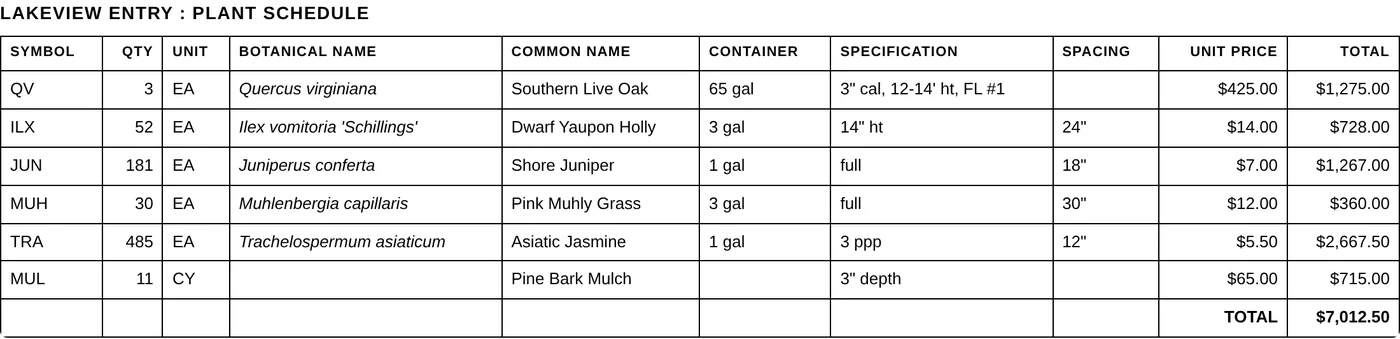
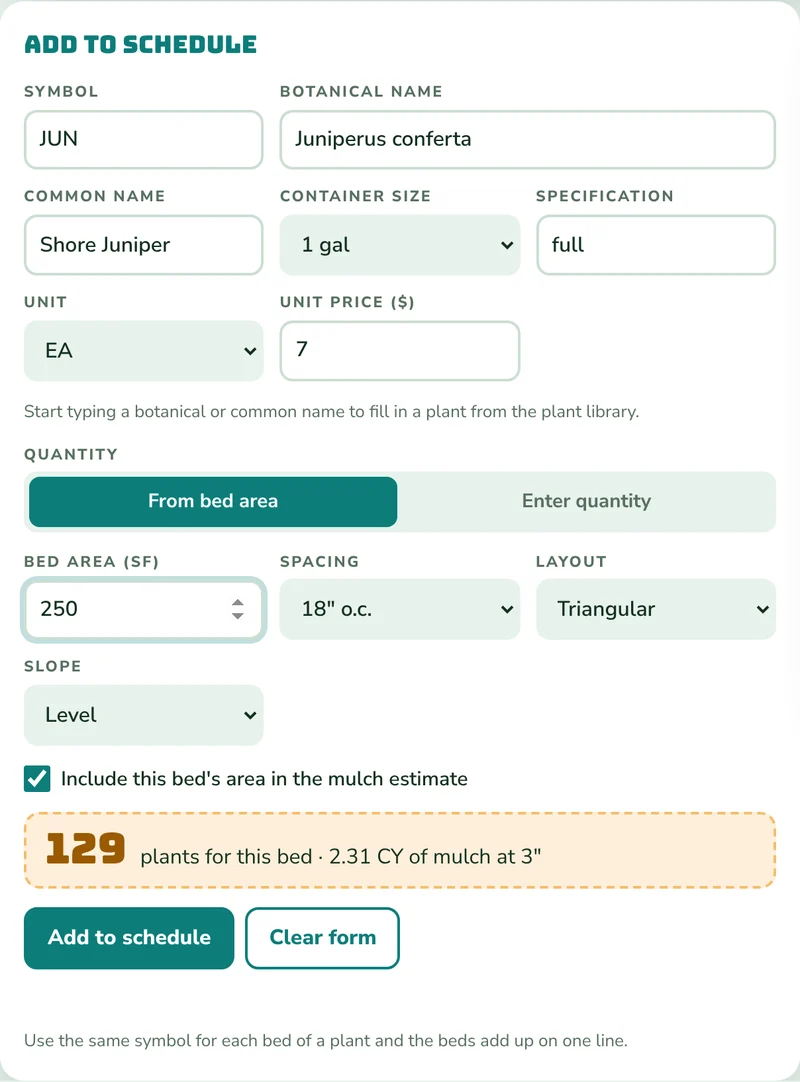
Two beds of Shore Juniper: one 250 square feet, one 100. Both at 18" on center, triangular, on level ground. Use the same symbol for both and they land on one schedule line.
- Bed 1 · 250 sf
- 129 plants
- Bed 2 · 100 sf
- 52 plants
- Schedule line
- 181
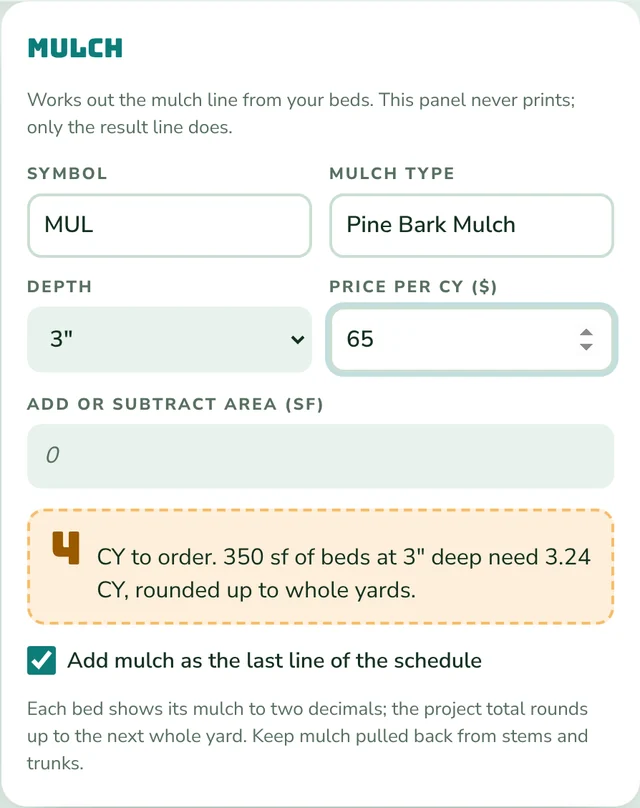
- Mulch · 350 sf at 3" needs 3.24 CY, rounded up
- 4 CY
- At $7 a plant and $65 a yard
- $1,527.00
Each bed rounds up before the beds combine. Counts are area-based estimates; bed edges, obstacles and ordering increments still get your review.

The whole thing in three steps.
Enter the beds.
Area, spacing, triangular or square, slope if there is one. Already know the count, like trees? Type the quantity instead.
Watch the schedule build.
Same symbol, same line. Names, specs, unit prices, line totals and a mulch line from the beds you include.
Put it on your plan.
Download it as an Excel file. Set column widths, row heights and order however you like, then copy it and paste it into your design software. Or print it.
New: the plant library, free while you build
Pick a plant and it fills in the names, container, spacing and a typical installed price. Free while you build.
Start typing a botanical, common or older name and pick the plant. It fills in the botanical and common names, container size, spacing and a typical installed price for Central Florida, from actual contractor bids over the last 12 months. Change anything; the specification is yours to write. Plants you add are saved for your next job. It starts with 70 common shrubs and groundcovers.
A schedule that looks like your schedule.
Your columns
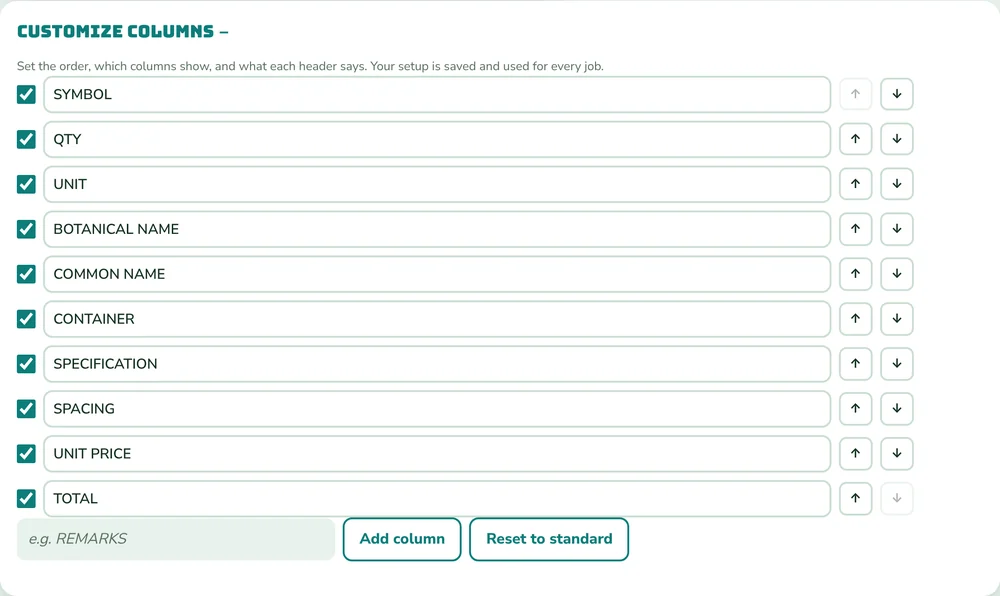
Rename headers, reorder them, hide the ones you don't use, add your own like REMARKS. Your setup is kept for every job.
Mulch from the beds
Pick which beds count, set the depth, add or subtract area. The cubic yards follow the beds and round up to a whole yard.
Prices on or off
Show prices for an estimate. Hide them for the construction set. One checkbox.
Job files
Name the job, save a file, reopen it later or on another computer. Work also saves in your browser as you go.
Run your own math.
Plug in your own numbers. Start with our working estimate of 50%, from preparing hundreds of plant schedules by hand. Adjust it for your workflow; actual time saved varies.
Run the numbers
Pro is $9.99 a month.
Real quick. Who built this?
A Florida landscape architect, after 29 years of drawing planting plans and counting the same beds by hand. Plant Counts is the tool I wanted on every one of those jobs.
Questions go to a real person: hello@getplantcounts.com.
Build free. Pay when it goes on the plan.
You can build a full schedule on your own project before you spend anything. No card needed.
| What you can do | Free | Pro |
|---|---|---|
| Build the full schedule: beds, quantities, mulch, prices, columns | Yes | Yes |
| Save and open job files | Yes | Yes |
| Download an Excel file to format and paste into your design software | No | Yes |
| Copy schedule as a plain table for Excel or Word | No | Yes |
| No | Yes | |
| Plant library: names, container, spacing and a typical installed price filled in | Yes | Yes |
- Cancel anytime in Manage billing. Pro runs to the end of the period you paid for.
- Full refund within 7 days of your first payment. A refund ends Pro right away.
- Your job files stay yours and keep working if you stop paying.
- Secure checkout by Stripe. Renews automatically until you cancel.
Fair questions.
Are the counts exact?
They are area-based estimates, rounded up for each bed, using triangular or square spacing with an optional slope adjustment. Final layout, edges and obstacles are still your call, the same as by hand.
Does it paste into my design software?
Yes, the same way you would paste any Excel table. Download the schedule as an Excel file, format it the way your sheets need, then copy and paste it into your design software. The exact paste steps depend on your program. Copy schedule also puts a plain table on your clipboard for Excel or Word.
Do I need to install anything?
No. It runs in your browser on a computer, tablet or phone.
What happens to my jobs if I cancel?
Nothing. Building schedules and saving or opening job files stay free. Only Copy, Excel and Print need Pro.
Can I try it first?
Yes. Build a whole schedule from your own project for free, then decide whether the exports are worth it to you.
Your next planting schedule can start here.
Enter the first bed. Add the next one. Watch it come together.
$9.99/month or $89/year. Digital access only.